
Install a Chat Widget on Your Website
To significantly increase enquiries and leads
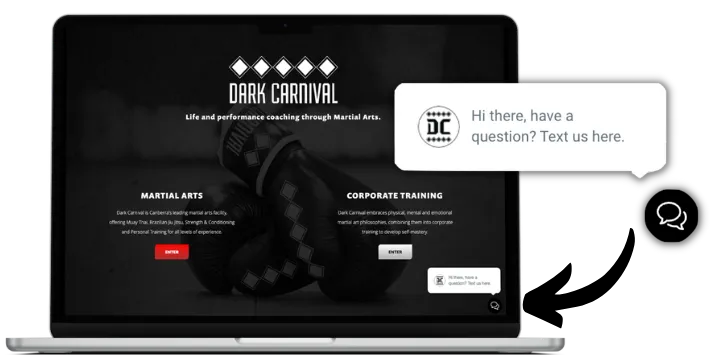
Why Should I Install Chat Widget on my website?
Because it will help you significantly boost the number of inquiries and leads. It's one of the easiest ways to generate leads without ad spend.
Where traditional live chat often results in a bad user experience due to lengthy response times, the Stand Out From The Pack™'s chat widget excels as it opens up a 2-way SMS chat, freeing the user to leave the website but continue the conversation!
The widget installation is simple and requires no development knowledge or technical skills. Simply follow instructions below:
Installing the Chat Widget on a Website built using the Stand Out From The Pack™
Your Stand Out From The Pack™ subscription includes a powerful tool which helps you connect with your website visitors and turn them into customers. It's called Webchat widget and it's one of the easiest ways to generate leads without ad spend.
You can create a chat widget in Stand Out From The Pack™ to enhance your communication opportunities with clients.
Follow these steps to create and use a widget on a funnel or website page:
Creating a Chat Widget
- Step 1: Login to your account
- Step 1: Go to the "Chat Widget" section.
- Step 2: Customize the chat bubble, widget window, and acknowledgement settings using the three available tabs.
- Step 3: See your changes reflected in the preview on the right-hand side.
- Step 4: Save your changes.
Adding the Chat Widget to a Funnel or Website
- Step 5: Go to Funnels or Websites.
- Step 6: Select the desired Funnel or Website.
- Step 7: Access the Settings.
- Step 8: Enable the Chat widget.
Need assistance with website development? Contact us to discuss your unique requirements. [email protected]
These chat widget communications will appear in your conversations tab of the CRM.
Congratulations!
You've now enabled one of the easiest ways to generate leads without ad spend.
Looking for more tutorials on setting up other things?
Visit our support portal by clicking the link below:
https://help.standoutfromthepack.com
PRO TIP: Enable Conversation AI to streamline your responses, engage with leads promptly, empower your team, save time, and deliver exceptional customer experiences!
To configure this, login to your account and go to 'Settings' ➝ 'Conversation AI
What is Conversation AI?
Conversation AI is an exceptional feature offered by Stand Out From The Pack™. However, access to this groundbreaking tool is limited to certain subscription plans. If it is not included in your current plan, you may need to upgrade. To determine if Conversation AI is available in your plan, please visit our pricing page at https://standoutfromthepack.com.au/signup.
To update your subscription please login to your account and go to 'Settings' ➝ 'Company Billing' ➝ Subscription Plans
And if you're stuck with anything get in touch by emailing [email protected]

Installing the Chat Widget on a WordPress Site
Your Stand Out From The Pack™ subscription includes a powerful tool which helps you connect with your website visitors and turn them into customers. It's called Webchat widget and it's one of the easiest ways to generate leads without ad spend.
Follow these steps to add a chat widget to your WordPress site:
- Step 1: Log in to your WordPress site and go to Plug-ins > Add New.
- Step 2: Search for "Lead Connector," click Install Now, and then Activate.
- Step 3: Once activated, you will see "Lead Connector" as a menu option on the left side of your dashboard.
- Step 4: Click on Lead Connector to access the settings page.
- Step 5: In the Stand Out From The Pack™, go to Settings > Business Info > Company Data, and copy your API key under "Company Data."
- Step 6: Paste the API key from the CRM into the API Key field in WordPress.
- Step 7: Check the box to enable the widget. Confirm or edit your heading and subheading. Click Save.
- Step 8: Open your WordPress site, and you will see the widget in the bottom right corner.
These chat widget communications will appear in your conversations tab of the CRM.
Congratulations!
You've now enabled one of the easiest ways to generate leads without ad spend.
Looking for more tutorials on setting up other things?
Visit our support portal by clicking the link below:
https://help.standoutfromthepack.com
PRO TIP: Enable Conversation AI to streamline your responses, engage with leads promptly, empower your team, save time, and deliver exceptional customer experiences!
To configure this, login to your account and go to 'Settings' ➝ 'Conversation AI
What is Conversation AI?
Conversation AI is an exceptional feature offered by Stand Out From The Pack™. However, access to this groundbreaking tool is limited to certain subscription plans. If it is not included in your current plan, you may need to upgrade. To determine if Conversation AI is available in your plan, please visit our pricing page at https://standoutfromthepack.com.au/signup.
To update your subscription please login to your account and go to 'Settings' ➝ 'Company Billing' ➝ Subscription Plans
And if you're stuck with anything get in touch by emailing [email protected]

Installing the Chat Widget on a Weebly Site
Your Stand Out From The Pack™ subscription includes a powerful tool which helps you connect with your website visitors and turn them into customers. It's called Webchat widget and it's one of the easiest ways to generate leads without ad spend.
Here's how:
First login to the Stand Out From The Pack™ and copy the embed code by going to Sites > Chat Widget > Get Code
Once you get the code, there are 2 methods how you can install it on your Weebly site:
Method 1: Adding a Custom Chat Widget with Weebly's Header Code Injection Feature
- Step 1: Log in to your Weebly account and navigate to the website editor.
- Step 2: Click on "Settings"
- Step 3: In the left-hand menu and select "SEO" from the options.
- Step 4: Scroll down to the "Header Code Injection" section and click "Edit".
- Step 5: Paste the code into the "Header Code Injection" box in Weebly.
Method 2: Adding a Custom Chat Widget with Weebly's Custom HTML/ Embed Code Element
- Step 1: Log in to your Weebly account and navigate to the website editor.
- Step 2: Click on "Elements" in the left-hand menu and select "Custom HTML/Embed Code" from the options.
- Step 3: Drag and drop the Custom HTML element onto your page where you want the chat widget to appear.
- Step 4: Paste the Chat code into the Custom HTML element in Weebly.
- Step 5: Click "Publish" to save your changes.
Congratulations!
You've now enabled one of the easiest ways to generate leads without ad spend.
PRO TIP: Enable Conversation AI to streamline your responses, engage with leads promptly, empower your team, save time, and deliver exceptional customer experiences!
To configure this, login to your account and go to 'Settings' ➝ 'Conversation AI
What is Conversation AI?
Conversation AI is an exceptional feature offered by Stand Out From The Pack™. However, access to this groundbreaking tool is limited to certain subscription plans. If it is not included in your current plan, you may need to upgrade. To determine if Conversation AI is available in your plan, please visit our pricing page at https://standoutfromthepack.com.au/signup
To update your subscription please login to your account and go to 'Settings' ➝ 'Company Billing' ➝ Subscription Plans
Looking for more tutorials on setting up other things?
Visit our support portal by clicking the link below:
https://help.standoutfromthepack.com
And if you're stuck with anything get in touch by emailing [email protected]

Installing the Chat Widget on a Wix Site
Your Stand Out From The Pack™ subscription includes a powerful tool which helps you connect with your website visitors and turn them into customers. It's called Webchat widget and it's one of the easiest ways to generate leads without ad spend.
Here's how:
First login to the Stand Out From The Pack™ and copy the embed code by going to Sites > Chat Widget > Get Code
Once you get the code, there are 2 methods how you can install it on your Wix site:
Method 1:
- Step 1: Log in to Wix account and navigate to the website's dashboard.
- Step 2: Click "Settings" in the left menu, then select "Custom Code" under the "Advanced" tab.
- Step 3: Click "Add Custom Code" in the section.
- Step 4: Paste the code snippet in "Code Settings" within the pop-up window.
- Step 5: Configure options:
Name: Enter a name for your code
Add Code to Pages: Choose "All Pages" and select "Load code once"
Place Code In: Choose "Head"
- Step 6: Click "Apply" to save changes.
- Step 7: The widget will now appear on every page of your Wix site.
Method 2:
- Step 1: Sign in to Wix account and launch Wix Editor.
- Step 2: Click Edit Site from the Dashboard.
- Step 3: Click the plus (+) icon in the left-side menu to access "Add Elements."
- Step 4: Choose "Embed" from the left sidebar menu.
- Step 5: Select "Embed HTML" under "Popular Embeds".
- Step 6: Click on "Code" in the new HTML box that appears.
- Step 7: Paste the widget code into the text field and press "Update."
- Step 8: Close the "HTML Settings" box.
- Step 9: The widget will now be visible in the HTML box on your page.
Congratulations!
You've now enabled one of the easiest ways to generate leads without ad spend.
PRO TIP: Enable Conversation AI to streamline your responses, engage with leads promptly, empower your team, save time, and deliver exceptional customer experiences!
To configure this, login to your account and go to 'Settings' ➝ 'Conversation AI'
What is Conversation AI?
Conversation AI is an exceptional feature offered by Stand Out From The Pack™. However, access to this groundbreaking tool is limited to certain subscription plans. If it is not included in your current plan, you may need to upgrade. To determine if Conversation AI is available in your plan, please visit our pricing page at https://standoutfromthepack.com.au/signup
To update your subscription please login to your account and go to 'Settings' ➝ 'Company Billing' ➝ Subscription Plans
Looking for more tutorials on setting up other things?
Visit our support portal by clicking the link below:
https://help.standoutfromthepack.com
And if you're stuck with anything get in touch by emailing [email protected]

Installing the Chat Widget on a Shopify Site
Your Stand Out From The Pack™ subscription includes a powerful tool which helps you connect with your website visitors and turn them into customers. It's called Webchat widget and it's one of the easiest ways to generate leads without ad spend.
Here are detailed steps on how to add a the chat widget to your Shopify website:
- Step 1: First login to the Stand Out From The Pack™ and copy the embed code by going to Sites > Chat Widget > Get Code
- Step 2: Log in to your Shopify account
- Step 3: From your Shopify dashboard, navigate to the "Online Store" section.
- Step 4: Select the theme that you want to edit and click on the "Actions" button. Choose "Edit code" from the drop-down menu.
- Step 5: In the list of files that appears, select the "Layout" folder and then select the "theme.liquid" file.
- Step 6: Locate the tag within the theme.liquid, then add embed code above it.
- Step 7: Save the changes
- Step 8: Go to your website and refresh the page. The chat widget should now be visible on your website.
- Step 9: Please test it out to make sure it's working correctly.
Congratulations!
You've now enabled one of the easiest ways to generate leads without ad spend.
PRO TIP: Enable Conversation AI to streamline your responses, engage with leads promptly, empower your team, save time, and deliver exceptional customer experiences!
To configure this, login to your account and go to 'Settings' ➝ 'Conversation AI'
What is Conversation AI?
Conversation AI is an exceptional feature offered by Stand Out From The Pack™. However, access to this groundbreaking tool is limited to certain subscription plans. If it is not included in your current plan, you may need to upgrade. To determine if Conversation AI is available in your plan, please visit our pricing page at https://standoutfromthepack.com.au/signup
To update your subscription please login to your account and go to 'Settings' ➝ 'Company Billing' ➝ Subscription Plans
Looking for more tutorials on setting up other things?
Visit our support portal by clicking the link below:
https://help.standoutfromthepack.com
And if you're stuck with anything get in touch by emailing [email protected]
Installing the Chat Widget on a Squarespace Site
Your Stand Out From The Pack™ subscription includes a powerful tool which helps you connect with your website visitors and turn them into customers. It's called Webchat widget and it's one of the easiest ways to generate leads without ad spend.
Here are detailed steps on how to add a the chat widget to your Squarespace website:
First login to the Stand Out From The Pack™ and copy the embed code by going to: Sites > Chat Widget > Get Code
Once you get the code, there are 2 methods how you can install it:
Method 1: Add a custom chat widget using Code Injection
- Step 1: Log in to your Squarespace account and navigate to the website to which you want to add the chat widget.
- Step 2: Click on "Settings" in the main menu.
- Step 3: Select "Developer Tools" in the "Website" section.
- Step 4: Click on "Code Injection"
- Step 5: Paste the chat widget code in the "Header" or "Footer" fields.
- Step 6: Click on "Save" to save the changes.
- Step 7: Preview your website to make sure the chat widget appears correctly.
Method 2: Add a custom chat widget using an Embed Block
- Step 1: Log in to your Squarespace account and navigate to the page where you want to add the chat widget.
- Step 2: Click on the page editor and select the section where you want to add the chat widget.
- Step 3: Click on the plus icon to add a new content block and select "Embed" from the drop-down menu.
- Step 4: Paste the chat widget code in the "Code Snippet" field.
- Step 5: Click on "Apply" to apply the changes.
- Step 6: Preview your website to make sure the chat widget appears correctly.
Congratulations!
You've now enabled one of the easiest ways to generate leads without ad spend.
PRO TIP: Enable Conversation AI to streamline your responses, engage with leads promptly, empower your team, save time, and deliver exceptional customer experiences!
To configure this, login to your account and go to 'Settings' ➝ 'Conversation AI'
What is Conversation AI?
Conversation AI is an exceptional feature offered by Stand Out From The Pack™. However, access to this groundbreaking tool is limited to certain subscription plans. If it is not included in your current plan, you may need to upgrade. To determine if Conversation AI is available in your plan, please visit our pricing page at https://standoutfromthepack.com.au/signup
To update your subscription please login to your account and go to 'Settings' ➝ 'Company Billing' ➝ Subscription Plans
Looking for more tutorials on setting up other things?
Visit our support portal by clicking the link below:
https://help.standoutfromthepack.com
And if you're stuck with anything get in touch by emailing [email protected]

Installing the Chat Widget on another website builder
Your Stand Out From The Pack™ subscription includes a powerful tool which helps you connect with your website visitors and turn them into customers. It's called Webchat widget and it's one of the easiest ways to generate leads without ad spend.
Here are detailed steps on how to add a the chat widget for your website:
First login to the Stand Out From The Pack™ and copy the embed code by going to: Sites > Chat Widget > Get Code
Once you get the code, please follow instructions to install it
- Step 1: Paste the chat widget code in the "Header" or "Footer" fields.
- Step 2: Click on "Save" to save the changes.
- Step 3: Preview your website to make sure the chat widget appears correctly.
Option 2: Add a custom chat widget using an Embed Block
- Step 1: To your website
- Step 2: Go to a page you want the widget included on and select the section where you want to add the chat widget and Embed the code using HTML
- Step 3: Apply the changes.
- Step 6: Preview your website to make sure the chat widget appears correctly.
Congratulations!
You've now enabled one of the easiest ways to generate leads without ad spend.
PRO TIP: Enable Conversation AI to streamline your responses, engage with leads promptly, empower your team, save time, and deliver exceptional customer experiences!
To configure this, login to your account and go to 'Settings' ➝ 'Conversation AI'
What is Conversation AI?
Conversation AI is an exceptional feature offered by Stand Out From The Pack™. However, access to this groundbreaking tool is limited to certain subscription plans. If it is not included in your current plan, you may need to upgrade. To determine if Conversation AI is available in your plan, please visit our pricing page at https://standoutfromthepack.com.au/signup
To update your subscription please login to your account and go to 'Settings' ➝ 'Company Billing' ➝ Subscription Plans
Looking for more tutorials on setting up other things?
Visit our support portal by clicking the link below:
https://help.standoutfromthepack.com
And if you're stuck with anything get in touch by emailing [email protected]
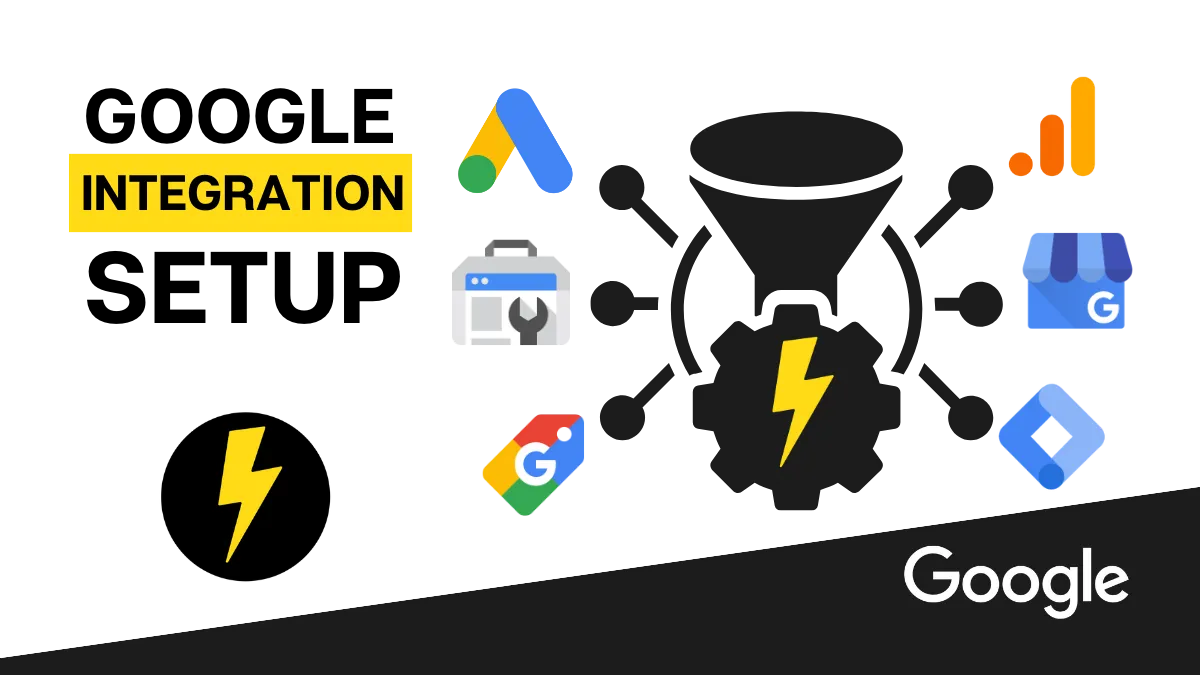
Request for Access to Your Google Assets 🚀
Analytics, Search Console, Tag Manager, Ad Account and Google My Business Listing
Important Pre-requisite
Before you proceed with providing us with access to Your Google Assets 🚀, you must have a Google Account that has admin access to the following three business tools:
Google Business Profile
(formerly Google My Business aka GMB)Google Analytics Account
and your Google Ad Account
Google Business Profile (formerly Google My Business)
Google Analytics Account
and your Google Ad Account
Below you'll find instructions how to set that up
(along with answers to frequently asked questions from our customers)
How to setup Google Account to have admin access to Analytics, Ads Account and GMB
To fix the issue of having different admin access emails for Google Analytics, Google Ads, and Google Business Profile, you can follow these steps:
Sign in to your Google Analytics account using the email address that has admin access.
In the Admin section, click on the "User Management" option under the Account column.
Click on the "+", then select "Add users".
Enter the email address associated with your Google Ads and/or Google Business Profile account.
Assign the admin access.
Click on the "Notify this user by email" checkbox if you want to send a notification to the added email address.
Finally, click on the "Add" button to save the changes.
By following these steps, you will grant admin access to the email address used for Google Ads and/or Google Business Profile, allowing you to manage all three platforms with the same login credentials.
PRO TIP: For easier and more secured access, we recommend creating a proper Google Workspace master admin account for your business and assigning admin level access to all of the following tools:Google Analytics
Google Search Console
Google Tag Manager
Google Ad Account
Google My Business Listing
and Youtube Channel
Need more help?
Get support from our comprehensive Help Center and related articles to find the solutions you need by clicking the link below:
https://help.standoutfromthepack.com
And if you're stuck with anything and need to contact us click here
What if I don't have Google Analytics, Google Business Profile, Google Tag Manager, Google Search Console, or Google Ad Account?
If you haven't signed up for any of these tools, simply click on the links below to create an account. They are all free to set up. Just make sure you use a secure Google account as the main admin owner. You can use a regular free Gmail account, but for better management and increased security, we recommend creating a proper Google Workspace master admin account for your business. Then, use that Google Workspace admin account to open free accounts for Google Analytics, Google Business Profile, Google Tag Manager, Google Search Console, and Google Ad Account. Creating a proper Google Workspace account only costs $6 per month and provides a solid foundation for your business. It's what we use at Stand Out From The Pack™ too!
- Click here to open a Google Analytics Account
- Click here to open a Google Ads Account
- Click here to create a Google Business Profile
- Click here to open a Google Tag Manager Account
- Click here to open a Google Search Console Account
Need more help?
Get support from our comprehensive Help Center and related articles to find the solutions you need by clicking the link below:
https://help.standoutfromthepack.com
And if you're stuck with anything and need to contact us click here
Here's how to Connect Your Google Account with the Stand Out From The Pack™
Step 1: Login to Stand Out From The Pack™
Step 2: Navigate to 'Settings' > 'Integrations'
Step 3: Connect your Google Workspace Admin Account by clicking in 'Sign in with Google'
IMPORTANT! Make sure that you connect a same Google Account that has Admin login access to your Google Business Profile (formerly Google My Business aka GMB), Google Analytics and your Google Ad Account.
Need more help?
Get support from our comprehensive Help Center and related articles to find the solutions you need by clicking the link below:
https://help.standoutfromthepack.com
And if you're stuck with anything and need to contact us click here

What is Google Workspace
Google Workspace is a comprehensive collection of cloud-based tools for productivity and collaboration provided by Google. It encompasses various applications like Gmail, Google Drive, Google Docs, Google Sheets, Google Slides, and more. We utilize it internally at Stand Out From The Pack™ and highly recommend its adoption for your business as well.
Need more help?
Get support from our comprehensive Help Center and related articles to find the solutions you need by clicking the link below:
https://help.standoutfromthepack.com
And if you're stuck with anything and need to contact us click here

Reasons why we recommend all our clients to have Google Workspace for their business
Professional email: With Google Workspace, you can have a custom email address that uses your domain name (e.g., [email protected]). This helps to establish a professional image for your business.
Collaboration and communication: Google Workspace provides various tools that enable seamless collaboration and communication among team members. You can work on documents together in real-time, schedule meetings, and easily share files with colleagues.
Cloud storage: Google Drive, included in Google Workspace, offers ample cloud storage space for your business files. This allows you to access your files from anywhere, on any device, and easily share them with others.
Security and reliability: Google Workspace provides robust security measures to protect your data, including advanced spam filtering, two-factor authentication, and data encryption. Additionally, Google's infrastructure ensures high reliability and uptime for your business applications.
Need more help?
Get support from our comprehensive Help Center and related articles to find the solutions you need by clicking the link below:
https://help.standoutfromthepack.com
And if you're stuck with anything and need to contact us click here
How to create a Google Workspace account for your business
To create a Google Workspace account for your business, follow these steps:
Go to the Google Workspace website by clicking here and click on the "Get started" button.
Select the plan that best suits your business needs.
(Google offers different pricing options depending on the size of your organization and the features you require.)Enter your business information, including your domain name, number of employees, and country.
Set up your administrator account by providing your contact information and creating a password.
Complete the payment process to activate your Google Workspace account.
Once your account is set up, you can start adding users, configuring settings, and accessing the various Google Workspace applications
Need more help?
Get support from our comprehensive Help Center and related articles to find the solutions you need by clicking the link below:
https://help.standoutfromthepack.com
And if you're stuck with anything and need to contact us click here
I already use Microsoft 365 for my business.. do I still need to have Google Workspace account too in order to open Google Analytics, Google Business Profile, Google Tag Manager, Google Search Console, and Google Ad Account?
No, you don't need a Google Workspace account to access Google Analytics, Google Business Profile, Google Tag Manager, Google Search Console, and Google Ad Account. These services can be accessed with a regular free Gmail account. However, it's worth considering the security benefits of a Google Workspace account, as they offer more protection than regular Gmail accounts.
In any case, whether you use free Gmail or Google Workspace account, it is important to have one Google Login with Admin level access to Google Analytics, Google Business Profile, and Google Ad Account.
This is because all these three tools need to be integrated with Stand Out From The Pack™, and this integration requires the use of a single unique Google account credential.
Need more help?
Get support from our comprehensive Help Center and related articles to find the solutions you need by clicking the link below:
https://help.standoutfromthepack.com
And if you're stuck with anything and need to contact us click here
Once you've completed this pre-requisite, click the button below:
To fully integrate your account, leverage analytics, increase lead generation, and optimize conversions, we kindly request access to the following Google assets:
*Initial setup of these integrations is subject to a fee and requires a payment. If you've not yet purchased the 'done-for-you account setup package, please click here
**Extra fees may apply for managing and optimizing these assets beyond the initial setup.

If you're still on 'Universal Analytics, we'll help you migrate to GA4 as UA are no longer supported by Google anyway
Your Google Analytics
By accessing your Google Analytics account, we can help you integrate it with your Stand Out From The Pack™ account. This ensures that you receive important analytics data from your website and funnels. We will also configure automation to push data about significant conversion events in the Stand Out From The Pack™ to your GA4 account.
This will allow you and us to analyze and interpret valuable data about your website's performance, track key metrics like website traffic, user behavior, conversions, and more. With this information, we can assist you in making data-driven decisions to optimize your marketing strategies and improve overall performance.
*Initial setup of these integrations is subject to a fee and requires a payment. If you've not yet purchased the 'done-for-you account setup package, please click here
📢 Extra fees will be applied for managing, monitoring, and optimizing your Google Analytics beyond the initial setup. For further details, please get in touch with our sales team.

(formerly known as Google My Business)
Your Google Business Profile
(formerly known as Google My Business)
By accessing your Google Business Profile, we can seamlessly integrate it with your Stand Out From The Pack™ account.
This integration offers you a range of benefits, including:
the ability to effortlessly respond to customer reviews, request additional reviews, and manage these requests.
You'll also have access to important statistics
Call tracking capabilities
Consolidated inquiries - so that no opportunity can ever "slip through the cracks"
and the convenience of scheduling content using the built-in Social Media Scheduler powered by AI Content Generator.
These features work together to enhance your visibility in local search results and attract more potential customers to your physical location.
*Initial setup of these integrations is subject to a fee and requires a payment. If you've not yet purchased the 'done-for-you account setup package, please click here
📢 If you wish to enhance your Google Business Profile beyond the initial setup, extra fees will apply. Contact our sales team to explore our 'Local SEO' service.

Your Google Tag Manager
With access to your Google Tag Manager, we can connect it to your Google Analytics account and help you effectively manage and deploy tracking codes and tags on your website. This enables you to track actions like form submissions, button clicks, and video views. By implementing these tags, you'll gain deeper insights into user behavior and accurately measure the effectiveness of marketing campaigns.
*Initial setup of these integrations is subject to a fee and requires a payment. If you've not yet purchased the 'done-for-you account setup package, please click here
📢 Beyond the initial setup of Google Tag Manager, there will be additional charges if you want us to manage, monitor, and optimize it. Contact our sales team if you're interested in these additional services.
Your Google Search Console
Access to Google Search Console provides us with valuable data about how your website is performing in organic search results. By understanding how users find and interact with your website through organic search, we can make informed recommendations on how to improve your website's search engine optimization (SEO) and increase organic traffic.
*Initial setup of these integrations is subject to a fee and requires a payment. If you've not yet purchased the 'done-for-you account setup package, please click here
📢 Additional charges will be incurred for extended SEO services beyond the initial setup. Contact our sales team if you're interested in these additional services.

Your Google Ads Account
By integrating your Google Ads account with Stand Out From The Pack™, you can revolutionize the way you manage and optimize your online advertising campaigns. This integration allows you to effortlessly monitor ad performance, fine-tune targeting settings, and refine keywords to maximize your return on investment (ROI). Even if you already work with an advertising agency, this integration will supercharge their efforts and help you achieve outstanding results. Analyzing campaign data will reveal valuable opportunities for improvement, and we will guide you through implementing strategies to drive more qualified traffic to your website.
With this integration, you'll gain the power to:
Set up automatic transmission of Google Ad Conversion events from Stand Out From The Pack™ directly to your Google Ads account.
Seamlessly integrate Google Ad reporting with Stand Out From The Pack™ for comprehensive insights and analysis.
To properly set up your Google Ad Reporting, we will need access to your Google Ads account. We will configure a proper UTM Tracking script as well as a Google Ad Precautionary Tracking Script for you.
*Initial setup of these integrations is subject to a fee and requires a payment. If you've not yet purchased the 'done-for-you account setup package, please click here
📢 If you require us to handle your Google Ads management beyond the initial integration and Ad Reporting setup, extra fees will apply. Contact our sales team if you're interested in these additional services.
Integrating the Stand Out From The Pack™ with your Google Assets is crucial for maximizing The growth potential of your business
In summary, by granting us access to all the above Google assets, you'll be able to*:
Effortlessly respond to customer reviews, request additional reviews, and manage these requests inside the Stand Out From The Pack™.
Have access to important statistics inside the Stand Out From The Pack™.
Enable Call tracking capabilities and new lead generation tactic
Consolidate inbound inquiries coming in from your Google Business Listing so that no opportunity can ever "slip through the cracks"
Have a convenience of scheduling content inside the Stand Out From The Pack™ for your Google Business Listing using the built-in Social Media Scheduler powered by AI Content Generator.
Track actions like form submissions, button clicks, and video views.
Gain deeper insights into user behavior and accurately measure the effectiveness of your marketing campaigns.
Understanding how users find and interact with your website through organic search
Improve your website's search engine optimization (SEO) and increase organic traffic.*
Revolutionize the way you manage and optimize your online advertising campaigns.
Inside the Stand Out From The Pack™ effortlessly monitor Ad performance, fine-tune targeting settings, and refine keywords to maximize your return on investment (ROI)
Set up automatic transmission of Google Ad Conversion events from Stand Out From The Pack™ directly to your Google Ads account.
Seamlessly integrate Google Ad reporting with Stand Out From The Pack™ for comprehensive insights and analysis.
*Initial setup of these integrations is subject to a fee and requires a payment. If you've not yet purchased the 'done-for-you account setup package, please click here
📢 Extra fees will be charged for managing, monitoring, and optimizing Google Analytics, enhancing Google Business Profile, managing Google Tag Manager, extended SEO services, and handling Google Ads account with advertising campaigns. Contact the sales team for more information.
Please let us know if you have any questions or concerns regarding this request by clicking here. Rest assured that we will handle your data securely and adhere to all privacy regulations.
We look forward to collaborating with you to achieve your marketing goals.
Frequently Asked Questions
Does this cost me anything?
No, it doesn't cost you anything to grant us access to your assets, however, we'll only handle the setup for you if you've purchased our 'Account Setup Package' (You would've been offered one when you signed up with us).If you haven't purchased it and would like us to handle the setup of your account, please click here to purchase it now.
But we will most definitely need access if you want us to perform additional services such as:
- business strategy & consulting
- marketing plan development
- audit of your current online marketing setup
- managing, monitoring, and/or optimizing your Google Analytics account
- enhancing your Google Business Profile
- managing and/or configuring your Google Tag Manager
- Search Engine Optimisation SEO
- managing, monitoring, and/or optimizing Google Ads account
- development and management of Google advertising campaigns such as search ads, display ads, video ads, shopping ads, app campaigns, local services ads, discovery ads, call-only ads, responsive display ads, and smart campaigns.
What specifically do you plan to with my Analytics account?
Once you add us as a new user to your analytics account, will do following actions*:
Check that your Google Analytics account is properly connected with your website and live traffic is showing
(If not, we will contact you to provide ways how to fix that)If you're still on 'Universal Analytics, we'll help you migrate to GA4 as UA are no longer supported by Google anyway
We will also configure automation to push data about significant conversion events in the Stand Out From The Pack™ to your GA4 account.
If you have any specific requests, questions, or concerns, please let us know by contacting us. We can address it before starting this process. Click here to contact us
*IMPORTANT
We'll perform these actions for you only if you've purchased our 'Account Setup Package' (You would've been offered one when you signed up with us).If you haven't purchased it and would like us to handle the setup of your account, please click here to purchase it now.
What specifically do you plan to with my Google Business Profile?
Once you add us as a new user to your Google Business Profile, will do following actions*:
Enable Google Business Messaging
Integrate inbound enquiries to come in to your account in the Stand Out From The Pack™
Enable Call Tracking and lead capture inside the Stand Out From The Pack™
Integrate stats from Google Business Profile with your account in the Stand Out From The Pack™
Integrate your Google Business Profile with Social media scheduler inside the Stand Out From The Pack™
If you have any specific requests, questions, or concerns, please let us know by contacting us. We can address it before starting this process. Click here to contact us
*IMPORTANT
We'll perform these actions for you only if you've purchased our 'Account Setup Package' (You would've been offered one when you signed up with us).If you haven't purchased it and would like us to handle the setup of your account, please click here to purchase it now.
What specifically do you plan to with my Google Tag Manager Account
Once you add us as a new user to your Google Tag Manager, will do following actions*:
Integrate your GA4 account with your Google Tag Manager
Integrate your website with Google Tag Manager
If you have any specific requests, questions, or concerns, please let us know by contacting us. We can address it before starting this process. Click here to contact us
*IMPORTANT
We'll perform these actions for you only if you've purchased our 'Account Setup Package' (You would've been offered one when you signed up with us).If you haven't purchased it and would like us to handle the setup of your account, please click here to purchase it now.
What specifically do you plan to with my Google Search Console
Once you add us as a new user to your Google Search Console, will do following actions*:
Integrate your GA4 account with your Google Search Console
Integrate your website with your Google Search Console
Talk to you about a need to upload a XML Sitemap to your Google Search Console (if you already have a website this part may not be required, however if you or we build any funnels for you this may need to be done so that Google can properly index your site for better SEO).
If you have any specific requests, questions, or concerns, please let us know by contacting us. We can address it before starting this process. Click here to contact us
*IMPORTANT
We'll perform these actions for you only if you've purchased our 'Account Setup Package' (You would've been offered one when you signed up with us).If you haven't purchased it and would like us to handle the setup of your account, please click here to purchase it now.
What specifically do you plan to with my Google Ads Account?
Once you add us as a new user to your Google Ads Account, will do following actions*:
We will configure a proper UTM Tracking script as well as a Google Ad Precautionary Tracking Script for you.
If you have any specific requests, questions, or concerns, please let us know by contacting us. We can address it before starting this process. Click here to contact us
*IMPORTANT
We'll perform these actions for you only if you've purchased our 'Account Setup Package' (You would've been offered one when you signed up with us).If you haven't purchased it and would like us to handle the setup of your account, please click here to purchase it now.
What is Conversion Tracking?
Google AdWords has a feature called conversion tracking. This allows you to track the success of your ads and optimize them accordingly. It’s an essential tool for advertisers who want to maximize their return on investment (ROI).
A conversion can be a specific customer action you've defined as valuable to your business, such as an online purchase or phone call. Conversion tracking shows you what happens after a customer interacts with your ads -- whether they purchased a product, signed up for your newsletter, and called your business.
I have more questions / concerns, what do i do?
If you have any more questions or concerns about providing us with access to your Google Assets, please reach out for assistance by contacting the team member on our team whom you've been in contact with already or by visiting the link below:
Please Note
We'll only handle the setup for you only if you've purchased our 'Account Setup Package'
(You would've been offered one when you signed up with us).
If you haven't purchased it and would like us to handle the setup of your account, please click below to purchase it now.
*If you've already purchased the account setup with us, please disregard it.
**If you're not sure please get in touch by clicking here to contact our billing team
Grant Access to Your Google Assets 🚀 via the form below:
Before you proceed, do you have a Google Account that has admin access to your Analytics, Google Business Profile and Google Ads? If no click the 'No' button

🚀 We are Stand Out From The Pack™. We're a digital marketing agency with an automated sales and marketing system as a service. We help small and medium size businesses capture, nurture and close more leads and increase profits at the same time. We strongly focus on generating more sales opportunities through effective marketing strategies and our state-of-the-art software powered by smart automations and AI. 🔥

Helping businesses capture, nurture and close more leads since 2017
Company
@ Copyright 2026 - VITFIT Pty Ltd t/a Stand Out From The Pack™
ABN 31 602 151 842
Made with ♥ In Canberra, Australia